In detail. The vectors spanning the hyperplane will not be orthogonal to each other (although there is actually a very slim chance of them being orthogonal). This gives the projected Mathematicians torus something of a skewed, or sheared, look; in some cases the shear can be rather extreme, making the torus sometimes long and narrow, sometimes flat and squat. When displayed in wire frame mode, the shape of the quadrilaterals on the surface of the torus will give you an idea of the extent of the shearing: prior to projection onto the hyperplane, they are actually squares.
By clicking on the reset button, another set of basis vectors for the hyperplane will be randomly chosen.
The wire/solid/ribbon frame button toggles between a wire frame representation of the Mathematicians torus, a solid representation, and a sliced representation.
The slider on the bottom of the window controls the size of the radii of the two circles that form the Mathematicians torus. When the slider is in the center, the circles have the same radius: as in our definition of the Mathematicians torus. However, we can extend our definition so that the Mathematicians torus is the Cartesian product of two circles with different radii. Moving the slider to the left or right will change the radius of one of the circles, while leaving the other radius fixed.
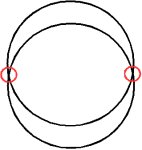
Observe that the projected Mathematicians torus has self-intersections: as you walk along the outer rim of the torus, there is a place where your path all of a sudden dips under the outer rim and puts you on the inner rim.