A function is a collection of code expressions to be executed.
Functions are used to organize and reuse code
We’ve actually been calling functions for a while now!
We can PASS values to functions, and then values can be RETURNED to us
We can create our own functions, so that we can perform tasks without having to rewrite code
Rewriting code is the worst
Suppose we were writing a calculator program. A common operation we’ll need to use is exponentiation; that is, we want to be able to raise an arbitrary number to an arbitrary power. For example, we want to calculate 3^7. How would we write code to do such an operation?
int base = 3;int power = 7;int result = 1;for(int i = 0; i < power; ++i){ result = result * base;}//once the loop above runs, the //value of result will be 2187
OK, so the code above works… but now what if we want to calculate 2^4? And say we wanted to do so right after calculating 3^7?
//We're doing 3 to the power of 7int base = 3;int power = 7;int result = 1;for(int i = 0; i < power; ++i){ result = result * base;}//OK, now do a new exponentiation//We're doing 2 to the power of 4base = 2;power = 4;result = 1;for(int i = 0; i < power; ++i){ result = result * base;}
See how we’re duplicating code here? This is an error-prone mess! We don’t want to have to repeat this same chunk of code in all the places in our program that would ever need exponentiation! So how do we solve this problem?
What if we could somehow refer to that chunk of code we’re using for exponentiation, without having to rewrite it everywhere? Maybe it’d look something like the following:
int exp1 = Exponent(3, 7);int exp2 = Exponent(2, 4);
We could use “Exponent” to refer to our chunk of code from earlier. Whenever we have need of it, we could use that name, and pass things TO it, to WORK on! (remember… instructions and data). Well… sure, it’d be neat if we could do something like this:
//When we use THIS NAME...Exponent(3, 7);//We're actually referring to THIS CODEbase = ???;power = ???;result = 1;for(int i = 0; i < power; ++i){ result = result * base;}
But to name a chunk of code and reuse it like that, we’d need to learn about functions! Let’s shelve our example for now, and come back to it in a bit.
Functions!
Functions are present in basically every programming language. They’re a way to wrap any number of code expressions together in a little package, so that they can be used repeatedly in different contexts.
Every program is actually just a bunch of functions! When our program starts, it ALWAYS starts in the Main function:
class Program{ static void Main() { Console.WriteLine("Hello World!"); }}
We’ve used a number of different functions already. Remember how we discussed the .Net Framework? So far we’ve mostly called the things below “utilities” or some other word… but they’re actually functions!
Functions usually take some input and produce some output (though they aren’t required to do either).
To use a function (which is CALLING or INVOKING a function), we write out the name of the function, and then put parentheses, and a semicolon. If the function takes input, the input goes in the parentheses:
string jank = "Look at this jank!";Console.WriteLine(jank);
So this is all well and good… but we haven’t yet talked about how to write a function in code. We’ve seen some functions we’ve used before, and we now know how to call a function if we ever made one… so how do we MAKE them?
Writing our own functions
If we wanted to write a function of our own, how would we do that?
Let’s look at a simple example:
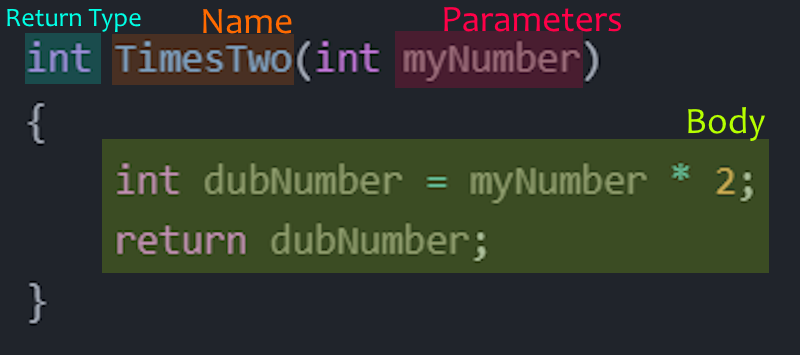
int TimesTwo(int myNumber){ int dubNumber = myNumber * 2; return dubNumber;}
The code above is something we haven’t seen before. It’s called a ==function declaration==.
OK, so what’s actually going on here? There are a number of parts we need to look at:
Function Name: TimesTwo
The name of the function is “TimesTwo”. This is how we’d refer to this chunk of code, if we wanted to use it in some other part of our program.
Return type: int
When this function is done executing code, it gives something back to us! And that something is… an integer!
Parameter: int myNumber
This function needs a value to do its job (data for the instructions). That value is an integer, and inside the function we refer to it as myNumber.
This function has a single parameter, but we could write a function with two, three, four… or zero parameters!
Function Body
The body of the function itself multiplies our number by 2, and then RETURNS that value. Return is a special C# keyword that is used to end a function’s execution, and give a value back to the calling code. When we return dubNumber, we’re copying the value from dubNumber and passing it back to the portion of code that called the function originally. And notice that dubNumber is an integer, which matches the return type of the function.
Tying it all together
So how would we write out our exponentiation function?
Write out the function definition for the function Exponent
Answer
int Exponent(int base, int power){ result = 1; for(int i = 0; i < power; ++i) { result = result * base; } return result;}
Void
This keyword has popped up a few times… what is it, and what does it mean?
No, it has nothing to do with the Shadow Realm, Risk of Rain, or “Insert other dumb media here”.
It is just a way of specifying that a function won’t return anything.
We’re calling the EatBoolean function, but it doesn’t return anything. It does stuff on its own, but it never gives us anything back. Additionally, our function doesn’t have a return statement… because it doesn’t need to return anything!
Whether your functions should return something or not is a design decision you’ll have to make as you craft your programs.
Yo Dawg, we heard you like functions…
Functions can actually call OTHER functions entirely! And of course, we’ve also been doing this all along! Looking back at the example above, Main is a function, and EatBoolean is a function… and we’re calling EatBoolean from inside Main. But we can go deeper with this:
We can follow the flow of code, through these function calls, to see what is happening! If you copy the functions above into a program, and maybe use breakpoints in Visual Studio… eh? (Note: if you don’t recall how to use breakpoints, ask Professor Hall! He’ll gladly show you!)
[! Question] Function Signature
Given the following function:
float Average(float a, float b)
Determine the following:
Name: ???
Return Type: ???
Parameters: ???
Answer
Name: Average
Return Type: float
Parameters: a (which is a float), b (which is a float)
[! Question] Function Signature
Given the following function:
bool DoAThing(string message, int number)
Determine the following:
Name: ???
Return Type: ???
Parameters: ???
[! Answer]- Function Signature
Name: DoAThing
Return Type: bool
Parameters: message(which is a string), number (which is an int)