Keep in mind… I’m “lying” to you, a bit. This isn’t the EXACT, 100% accurate version of how all of these things work. We’re truncating things a bit, because expounding on all of these topics would take too long, and it’s important that we jump into programming soon. However, the information presented here is true enough for our purposes; if you’d like to learn more, you can look up some of these topics on your own.
How do computers DO STUFF?
The fundamental concept that drives computers is electronic circuits. Specifically, we can use small electronic components to store charges of electricity. When we store an electric charge in a super-tiny electronic component, we think of that component as being ON. Otherwise, this component is OFF. We can also think of OFF/ON as 0/1.
We can use groups of 0s and 1s to represent… well, anything we want! Let’s look at some examples together!
- Binary numbers!
- Binary… images?
- Instructions!
- It’s all up to us!
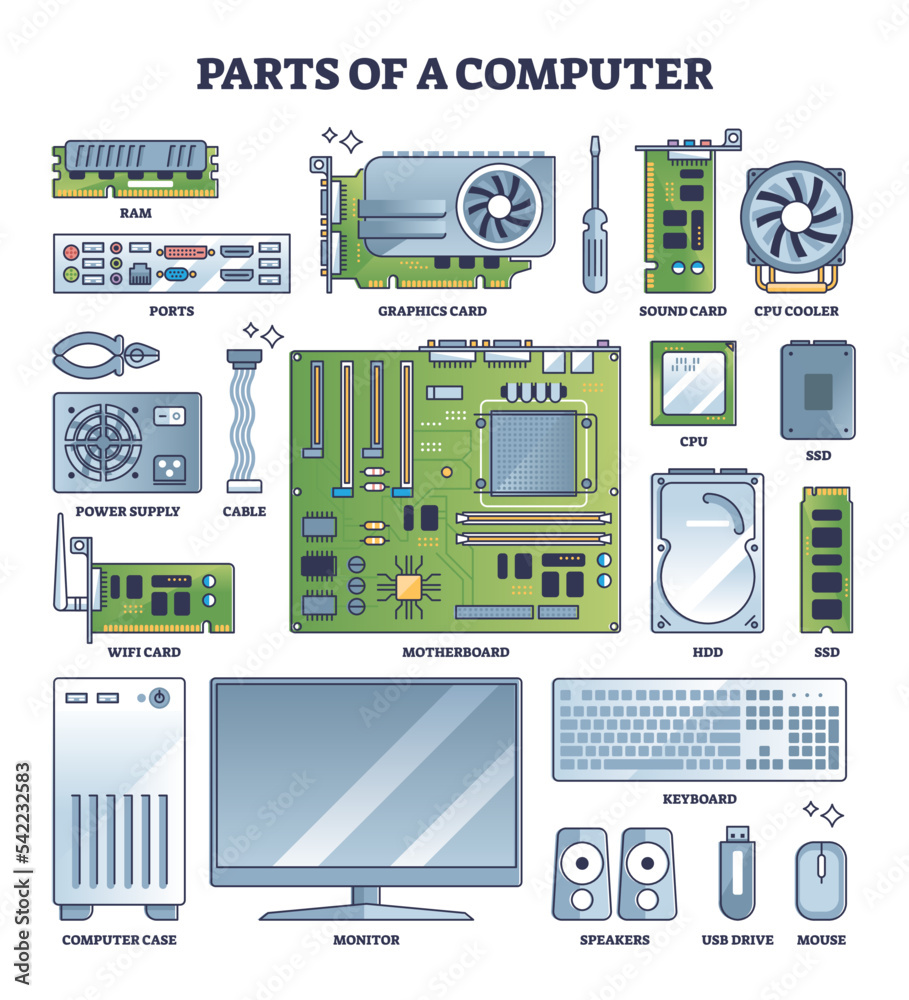
Modern computers are able to manipulate these tiny circuits VERY QUICKLY, and in LARGE QUANTITIES. Let’s look at some of the PC parts that make this possible!
Basic Computer Parts
Power Supply: Distributes electricity to all PC parts.
Motherboard: Connects all PC parts and mediates their communications.
CPU: Processes and executes instructions. Addition, multiplication, etc. It can work fast, but it isn’t smart. Think of it like… a weird little machine that is AMAZING at Origami… we will come back to this!

RAM: Stores data (0s and 1s) for all currently active applications. It’s like the “working memory” of a PC.
Storage Drive: Stores long-term data (0s and 1s) such as files and installed applications.
Graphics Card: Processes visual information really fast and displays it to the monitor(s).
Basic Computer Operation
Firmware (BIOS)
Basic input/output system of a computer
When a PC is powered on, the BIOS will configure hardware (fan speed, etc), and it will boot the actual operating system
flowchart LR
	id1((POWER<br>BUTTON))
	id2(BIOS)
	id3(Windows<br>Operating System)
	id1 --> id2 --> id3
Operating System
The operating system (OS) is sorta like a big program that manages all other programs
It is the boss of running applications, and handles their access to resources (like memory)
It also handles peripherals (keyboard, mouse, headphones)
Files and folders are handled by the OS
Running programs need access to the mouse, computer memory, etc, and the OS acts as the intermediary
flowchart LR
	id1(Programs)
	id2(Operating<br>System)
	id3{{"System resources<br>(Memory, File System, Peripherals)"}}
	id1 --> id2 --> id3 --> id2 --> id1
Applications (programs)
Chrome, Steam, MS Word, Photoshop, etc
When an application starts, the OS gives it some memory and starts executing instructions (by that we mean, the OS is feeding a program’s instructions to the CPU)
Applications ask the OS for resources, to perform all kinds of tasks
Applications will manipulate the files on your PC (text, picture, video, save files, etc)
They all compete for resources (memory, network bandwidth, graphics card)
OK, cool… what does this have to do with programming?
Programs are just sets of instructions, and the data they operate on
When a program is running, the program’s instructions go to the CPU
For example, a calculator program is adding two really big numbers together
The INSTRUCTION to add the two numbers is part of a program’s CODE
The operating system will hand that instruction, and the two numbers, to the CPU
The CPU understands the instruction, and adds the two numbers
The result flows back into the program’s memory, in RAM
What is programming?
Programming is writing human-readable code that is translated into machine code
Human-readable code ⇒ C#, C++, Java, Python, etc
Machine code ⇒ 0001010010101001010101110100111111000101
We write code that is understandable to humans, but must be converted into something machines can understand
Code is just a text file!… that is then converted into an executable (a program, binary) …but why?
Everything is converted into 1’s and 0’s because CPUs are really good at manipulating numbers (really, small electronic circuits that hold representations of numbers!)
Programming Workflow
There are a number of steps we go through when writing programs:
- Edit the source/code files
- Compile the code
- Create a program (executable)
- Run the program
- Test, Refactor, Optimize
We’ll talk more about each of these steps as we write our first programs.
---
title: Programming Workflow
---
flowchart LR
z(START HERE)
a["Edit code \n (just a text file)"]
b["SAVE<br>Ctrl + Shift + S"]
c["Compile code \n(build)"]
d["Generate .exe"]
e["Run .exe"]
f[Fix compile errors]
g[Optimize and improve]
h[Fix bugs]
z ==> a --> b --> c -->|Success!| d --> e -->|Success!| g --> a
 c -->|ERRORS| f --> a
 e -->|Doesn't do what we want...| h --> a
 h ~~~ g

 classDef startNode stroke:#ffffff,stroke-width:4px,color:#fff;
 classDef goodNode stroke:#2bff24,stroke-width:4px,color:#fff;
 classDef runNode stroke:#2471ff,stroke-width:4px,color:#fff;
 classDef badNode stroke:#f22222,stroke-width:4px,color:#fff,stroke-dasharray: 5 5;
 class z startNode;
 class a,b,c,d,g goodNode;
 class e runNode;
 class f,h badNode;
Visual Studio
We need a software suite that allows us to edit and compile code. We’ll be using Visual Studio, which is an IDE (an Integrated Development Environment). For instructions on how to download Visual Studio and the MSVC compiler, visit the Software Installation Guide.
Program Structure
Every program starts with a main function, like so:
#include <stdio.h>

int main()
{
	//The code we write will go HERE!
	//IN THESE CURLY BRACES!
}
We write lines of code that store and manipulate data, and put them in this main function (meaning, in the curly braces).
Each line of code is ended with a semicolon ( ; )
When the program runs, each line of code is executed, from top to bottom.
Once all of the code has been executed, the program closes.
A common first program we could write looks like this:
#include <stdio.h>

int main()
{
	printf("Hello world!");
}
For information on how to compile a C program in Visual Studio, visit the how to compile tutorial.