https://pages.cs.wisc.edu/~remzi/OSTEP/vm-intro.pdf
How do we virtualize memory?
First, we need to think about how we hold multiple processes in memory at one time:
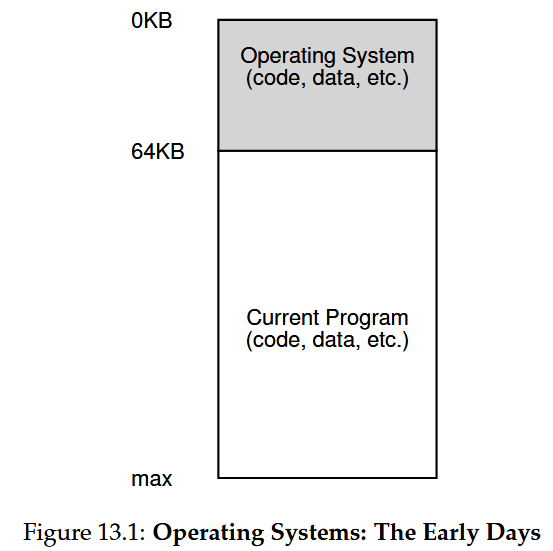
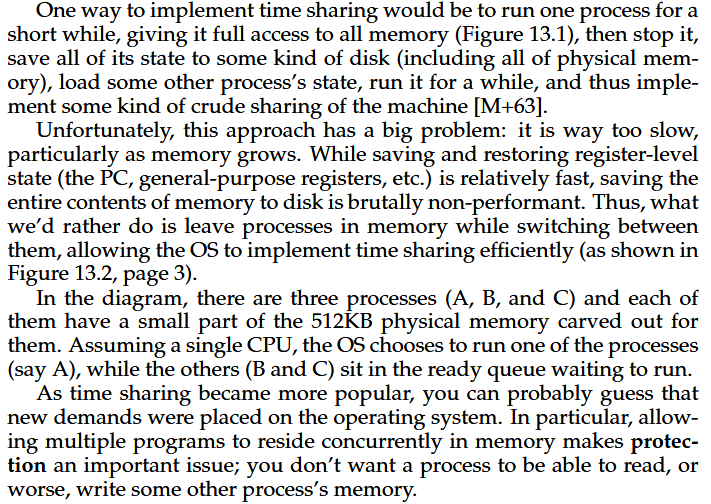
OK, so we can’t switch processes in and out of RAM so much… for one, we have WAY more RAM now than in the days when this problem first arose, so we have the space to hold lots of processes! But for another, we want to run LOTS of processes at the same time, so doing this switching constantly in/out of RAM will be slow if we do so pretty often. So we need to just stick all of our processes in RAM (as much/often as possible) and give them each an address space.
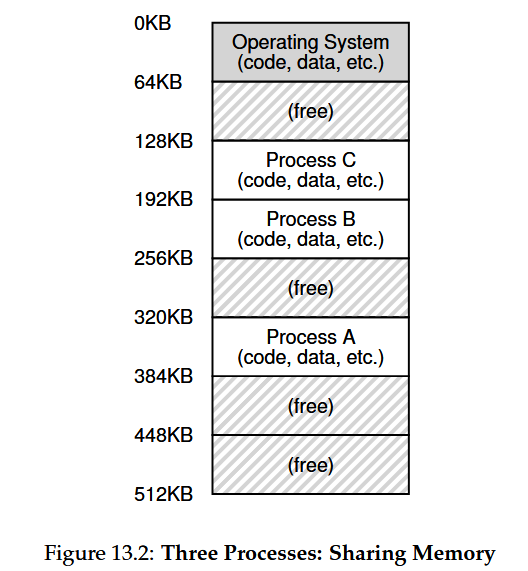
The Address Space of a Process
Remember: Segmentation SUCKS
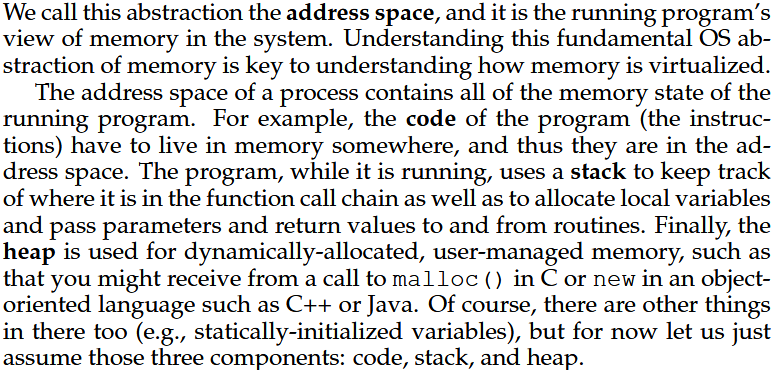
Previously we talked about how the virtualization of memory might work. We need to fit the address space of our process into RAM somehow!
What three memory sections did we talk about last time, that belong to a process' address space?
Stack Heap Code/Instructions (there are some other tiny sections but we’ve simplified our discussion to these three sections)
We could just choose to stick the whole address space of a process straight into RAM. The issue is that we have large swaths of open space between our stack and heap segments, that we can’t really get rid of. What if our process never uses that memory? We’re leaving lots of space unused in RAM just because a process MIGHT use that space!
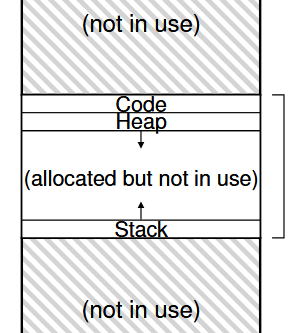
Instead, we could segment our process, and put those segments into memory separately. We’ve solved internal fragmentation, but created external fragmentation! It’s now difficult to control growing/shrinking/changing memory generally in RAM without compacting the different segments together, which creates problems of its own!
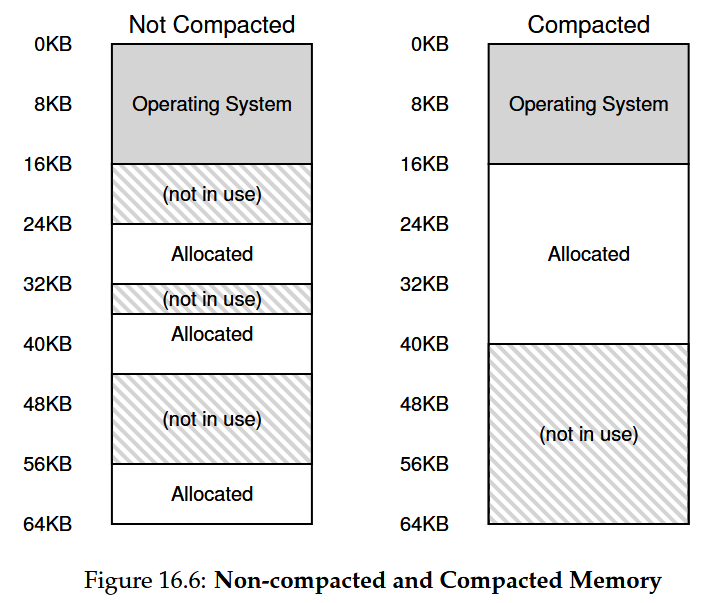
If you wanna know more about memory management...
Chapter 17 of the textbook has an excellent survey of the different kinds of memory management schemes that exist to handle the problems posed by segmentation. The next approach we’ll talk about, Paging/Page Tables, avoids the segmentation issue altogether, but it’s still worth reviewing the concepts in Chapter 17 to understand WHY modern OS’s have opted for paging instead.
So instead we’re taking a different approach: we’re going to slice the address space of all processes into fixed chunks, and we’re going to store those chunks in slots in RAM.
Paging
Some definitions:
Page
A fixed slice of a process’ address space
Page Frame
A physical memory slot that a page fits into (same size as a page)
Let’s take this one step at a time. What does it mean for a process to be split into pages?
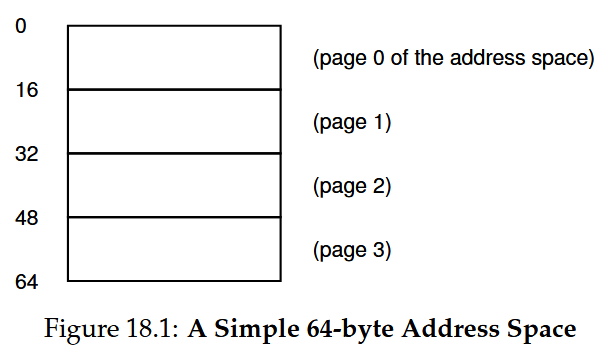
The image above shows the address space of a process that is currently running. We have sliced the process into 4 PAGES, each 16 bytes in size. The size of the address space and the pages are WAY smaller than in real life, but this is a simple example, so roll with it.
OK, so we have a process whose address space is split into pages… what now? Now we need to put it into physical RAM somewhere, like so:
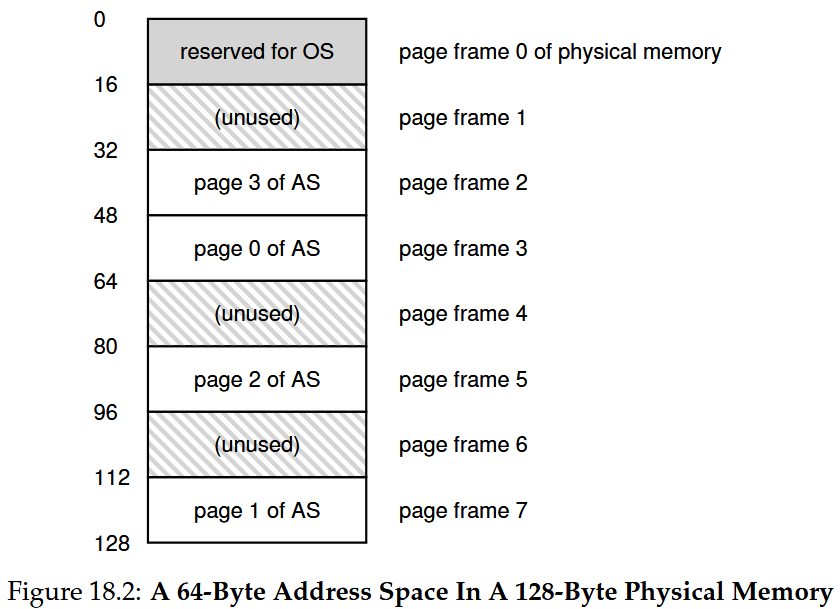
We can see that our physical RAM above contains four pages of a process’s address space. Each slot in RAM that can hold a Page is called a Page Frame. You can almost think of RAM as a giant array of pages frames! Each page frame contains one page. And each page is a portion of a process’s address space. The pages of any one process are likely spread out among a number of different non-sequential page frames, as per the example above. To be explicit about what the example above is showing:
	Virtual Page			Physical Frame
	[0] 			-> 		3
	[1]				->		7
	[2]				->		5
	[3]				->		2
Page 0 of our process exists on physical frame 3
Page 1 of our process exists on physical frame 7
Page 2 of our process exists on physical frame 5
Page 3 of our process exists on physical frame 2
So throwing a process into RAM is a much simpler endeavor! Whenever a new process needs to be placed into RAM, the OS just needs to find free page frames to stick the pages into. To accomplish this, the OS knows which page frames are free, and which are occupied by a running process, and sticks new pages into RAM accordingly.
Page Tables
Wait, so a running process has pages that are likely spread out all across physical RAM… ? How do we keep track of where a process’s address space is then? Enter, the Page Table.
Page Table
A per-process data structure that maps the virtual pages of a process’s address space to physical memory/RAM The job of the page table is to store address translations, from virtual pages to physical page frames
The OS keeps a PAGE TABLE for each individual running process. For example, if Minecraft is running, the page table for Minecraft will be a map of which physical frames contain which slices of Minecraft’s address space.
We can also look back at the example above to see a simple page table:
	Virtual Page			Physical Frame
	[0] 			-> 		3
	[1]				->		7
	[2]				->		5
	[3]				->		2
So now whenever we access memory, these are our steps:
- Process performs a memory access at a particular (virtual) address
- The address is translated into two things:
- A virtual page number/index
- An offset into the physical page’s memory
- Since we know which virtual page we want, we can look in the page table
- The page table tells us where that virtual page is physically
- For example, in the table above, the first portion of our process is on physical frame 3
- The virtual page number VPN (0) is translated to a physical frame number PFN (3)
- Finally, we can go to the correct physical page, use our offset, and access physical memory
But… where ARE the page tables we wanna look at? They’re actually in RAM as well! OK… but why? Think about how, if we were using segments, we just had registers (per process, in the PCB) that stored where the different segment start/ends were located (base/bound pairs). That’s all well and good for a process with only a few segments… but we could have many different pages for our process, and they could be all over the place!
The size of a single page for a process is typically 4KB, for a 32-bit address space.
VPN -> 20 bits
2^20 -> 1048576 -> 1MB

Offset -> 12 bits
2^12 -> 4096 -> 4KB
(The offset must range from 0 to 4095)
That means our process could have roughly 1 million pages that we need to map to! How much space do we need in memory to manage the entry for each page? Let’s say we can get it down to 4 bytes That’s still 4 bytes * 1 million → 4MB of memory just to store the page table for a single process! … what if you’ve got 100 processes running on your PC (which is probably happening right now!) That’s 400MB of memory (almost half a GIG) just to keep track of page entries!
Previously, we just stored address translation stuff in the PCB… but now we’ve run out of space! It’s easier to just store the page tables in some memory in RAM controlled by the OS. And if we think about how we GET TO the page table in the first place, seems simple enough to have a register (stored in the PCB) that tells us where in RAM the page table for THIS PROCESS is.
So what does a Page Table LOOK LIKE?
The simplest kind of Page Table is just… an array (linear page table). Basically, if you’re looking for virtual page 2, go to index 2 in the Page Table array. The entry at that spot in the array is the PHYSICAL page, which we’d then go to for our actual memory access.
	Virtual Page			Physical Frame
	[0] 			-> 		7
	[1]				->		3
	[2]				->		1
	[4]				->		6
Page 0 of our process exists on physical frame 7
Page 1 of our process exists on physical frame 3
Page 2 of our process exists on physical frame 1
Page 3 of our process exists on physical frame 6
Each index in the page table contains more than just the physical frame number though! We need some additional bits, to tell us:
- If the page is valid
- If the page is in physical memory (RAM) or on disk
- Yeah, we haven’t reached that part yet, but we will :)
- Page permissions (can we read/write to this page? Is it user, or kernel only?)
- If the page is POPULAR → should it be swapped out, or kept in?
OK, so are we done? Is this the final configuration of how we virtualize our memory? No, not quite. Because it turns out, we can definitely improve on our current page table solution. Let’s illustrate how bad things currently are with an example! https://pages.cs.wisc.edu/~remzi/OSTEP/vm-paging.pdf
First, a simple loop. Then broken down into assembly instructions:
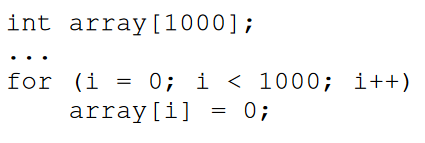
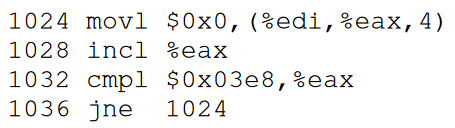
- Move 0 into the array location
- Increment the array index
- Loop condition
- Jump back to the top of the loop
How many memory accesses do we need to perform, just for these 4 instructions?
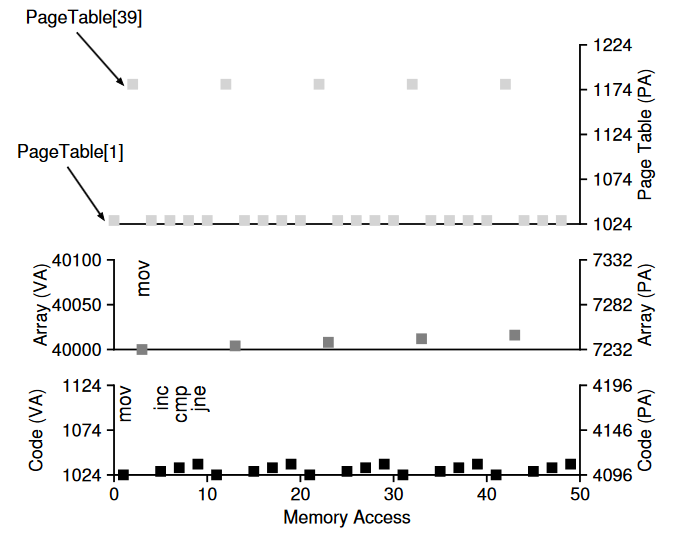
We’re actually performing 10 memory accesses on every loop iteration! 4 instruction fetches, 1 memory update (Mov), and 5 page table accesses (4 for fetches, and 1 for the memory update). That’s a LOT of memory access just for these simple instructions! Can we cut it down at all?
OK, how do we avoid this?
Translation Look-aside Buffer
The magical wonderful TLB → translation-lookaside buffer! Basically cache, but for address translation.
REMINDER/SUMMARY: Why do we need the TLB?
Segmentation Sucks
- Segmenting (separating different segments of a program’s Address Space and putting them into RAM separately) is a no-go
- Leads to fragmentation (when we try to expand the stack/heap)
- Compaction helps (basically tetris-ing our memory every so often) but is a huge pain
The Solution: Paging
- So instead we use Paging: we split the Address Space of a process into fixed-size chunks
- (In modern OSs page size is typically 4KB)
- RAM is also now seen as fixed-size slots, called Page Frames
- The pages of a process could be scattered anywhere in RAM
- To find which physical frames hold the pages of a process’ AS, each process now has an associated Page Table,
- A page table maps a VPN (virtual page number) to a PFN (physical frame number)
- The Page Tables themselves are also stored in RAM
A memory of a memory…
- However, we must now perform two memory accesses per instruction fetch: > * First: got to the page table to translate virtual→physical, > * Second: go to the physical address to get what we actually want > * If our instruction reads/writes from memory, that creates even MORE accesses
- To mitigate the slowdown of multiple memory accesses, we use the TLB (Translation Lookaside Buffer)
Remember the memory hierarchy: RAM is actually SLOWWWWWW in comparison to cache (and the TLB). If we can fit some of our memory translations into cache… BIG SPEEDUP! TLB is part of the MMU of our CPU cores (can live between levels of cache, or between cache and CPU, etc… just depends on the system!)
So NOW our process is slightly different;
- Instead of just looking at the page table in RAM, we definitely wanna check the TLB first
- If the TLB has the translation we want, we can quickly go to our desired physical address
- Otherwise, we have to go to RAM to translate our address
- We then store the relevant page table translation we just did into the TLB
- Thus, next time we get this page, we won’t have a TLB miss

How is a TLB miss handled?
Either hardware or software handles it, just depends on the system. In modern systems, usually the hardware freaks out on a TLB miss, alerting the Kernel that it has some important stuff to do! The kernel will use special instructions to update the TLB, then hardware will try again. This process is obviously longer if the pages we want are on disk instead of in RAM (ugh, super gross).
A contrived example
OK, so what are the implications of the TLB for programmers?
Basically: try to avoid TLB misses as much as possible. This helps us avoid the round-trip needed to store missing address translations in the TLB. OK, but how do we write programs that minimize TLB misses?
Let’s think about a contrived example involving a linked list. Say you’re creating a 3D space exploration game, where your ship jets around and has space dogfights Every so often cruiser ships will spawn at the periphery of the map These ships are added to a linked list of cruiser ships, but ships aren’t added/removed very often In the meantime, we’re allocating all sorts of stuff on the heap! Particles, bullets, smaller enemy ships, etc So our individual, infrequent mallocs of cruiser ships mean the list could be spread out over many different pages Whenever we need to access the linked list to update the cruisers, we’re not taking advantage of LOCALITY
Locality
Temporal Locality: Whenever we access memory, we’re likely to access that same address again in the near future
Spatial Locality: Whenever we access memory, we’re likely to use memory addresses physically near that one too
Our linked list has individually malloc’d ships linked together, and the location of each node could be in different sections of the heap, meaning they could be on different PAGES entirely! So if we walk this list to update the cruisers, we may end up having a bunch of TLB misses!
This also hurts other parts of our game, since space in the TLB is finite! So whenever we access some other memory that is NOT spread out among a bunch of pages, it may have been kicked out of the TLB to make room for our janky list!
How could we otherwise structure our list of cruiser ships to avoid this scenario?
- Malloc one big hunk of “cruiser ship” memory at the beginning, and allocate ships from that block
- Sort of like using a STD Vector?
- If we run out of room, we can make another large allocation?
- Use a static array, on the stack, and know what our limitations are for “max number of cruisers”
- So much focus is spent on “I DUNNO HOW MANY I WILL HAVE”… girl, just make a damn array and be done
If we can craft our programs to have more spatial and temporal locality, it can lead to faster programs that don’t TLB miss as often. This is why memory management is so important! It isn’t just about having more compact stuff, it’s about SPEED! The SIZE of the structs/classes you create, their memory access patterns, and WHERE they live relative to each other, all affect the speed of your program, because they affect TLB and Cache hits/misses.
What’s in a TLB?
TLB has a bunch of entries that map from virtual memory to physical memory There could be 32, 64, or 128 entries in the TLB, just depends on the size (different for every system)
Basically each TLB entry has the following fields:
- VPN (virtual page number)
- PFN (physical page number that the VPN maps to)
- Other bits (all kinds of dark magic)
- Protection bit (read/write vs read/execute, for heap/code pages)
- Could contain an address space identifier (we’ll discuss this shortly)
- Valid bit (is this translation valid? Used on startup, or context switch)
Wait, what about Context Switches?
Oh, right! That thing the OS does, to make sure all the different processes can actually run! Well, imagine you’re running a process, and the TLB has been filled with a bunch of translations for the currently running process. That means each VPN corresponds to the process that CURRENTLY resides in memory. Once a context switch occurs, every entry in the TLB is now invalid!
To illustrate, say we’re running Minecraft, whose VPN 0 maps to physical frame 472, and that translation exists in the TLB. If a context switch happens and we’re now running the instructions for Elden Ring, the VPN 0 of Elden Ring does NOT correspond to physical frame 472. It maps to some other frame, like 724. So how do we make sure the TLB starts working correctly again?
The most straightforward way… is to FLUSH it! Since the entire TLB is invalid, we can just set all of the valid bits to invalid, which lets the OS/hardware know that these TLB entries won’t work for the process we just switched in. The implication being… the first several memory accesses we do with this new process are going to be TLB misses, which sucks…
Some systems put an ASID, or Address Space Identifier (sometimes called a Tag), on each TLB entry, to associate it with an address space. This means the entire TLB may not need to be flushed for each context switch. This does however create some overhead, as the ASIDs need to be compared and managed when a context switch happens, whereas a full flush requires less specialized code/hardware. It also means the OS must set a hardware register to the current ASID, so that it knows which TLB entries are OK to use.
When the TLB fills up…
So what happens if a TLB is filled up with entries? How does the OS decide which entry to replace with a new, needed TLB entry? There are many different theories/methods for how to replace entries, but one of the most straightforward is to use a least-recently-used (LRU) scheme. Basically, the least recently accessed TLB entry is evicted from the TLB, and a new entry is put in that spot. Some systems use a random policy that evicts an entry at random, which avoids some of the issues seen with the LRU scheme.
Paging on the Final Exam
Define Page Table, Page, and Page Frame
Page → fixed-size slice of a process’s address space
Page Frame → physical memory slot (RAM) that a page fits into
Page Table → a per process structure to tra ck pages of that process, exists in RAM
If we were using a Page Table without a TLB (and not an “inverted” page table), how many memory accesses must be done for a single instruction? Assume that the instruction does not read/write to memory.
2 accesses per instruction
Explain your answer above; WHY are that many memory accesses happening for a single instruction
Need to access the page table to see where the instruction is, then fetch THAT location to get the actual instruction
What is the Translation-lookaside buffer? (Hint: use the word cache in your answer
A cache for page table accesses
Briefly (one sentence) describe what it means for a TLB miss to occur.
It means the page lookup that just occurred wasn’t in the TLB, so it needs to be fetched and cached into the TLB
Define Temporal Locality, as it relates to memory access
When an address (instruction/data) is accessed, it is more likely to be accessed again in the near future
Define Spatial Locality, as it relates to memory access
When an address (instruction/data) is accessed, addresses near it are more likely to be accessed
Why might a traditional Linked List data structure be bad for Spatial and Temporal locality
The allocated memory could be on different pages, which means the memory of each node will be spread out (spatial) The memory around these nodes won’t necessarily be accessed again soon, meaning we’ll cache memory we don’t need (temporal)
What are the implications for the TLB when a context switch occurs
The TLB will have page table lookups for a process that is no longer being executed in the CPU
We discussed two different solutions for the problem in the previous question. In two sentences, describe one of those solutions.
Flush the TLB, most straightforward way, bunch of TLB misses occur initially but TLB will be filled with correct entries Use an ASID, so we can know which entries correspond to the currently running process