The dictionary data structure is used for a very specific purpose. Let’s go through a contrived example to show the necessity for such a structure.
Counting Words
Let’s say you wanted to look at all of the Lord of the Rings books, and you wanted to catalogue all the unique words in those books. Further, you want to count the number of times those words appear in the books. And let’s assume the books are all contained in a single text document that you can open/read in C#.
We’d first read the text into a string, split that text into an array of strings (the individual words in the text) and then we’d iterate through those words:
string bookText = File.ReadAllText("LOTR.txt");

//We'd need to split on more than just spaces,
//but that's not important right now

string[] bookWords = bookText.Split(' ');

for(int i = 0; i < bookWords.Length; ++i)
{
	//What now?
}
So now that we’re iterating through all of the words… what do we do? Well we could create two lists: one list to hold the unique words, and another to hold the count of each word. As we iterate through all the words, we add them to the list of words and increment the count of that word:
List<string> lWords = new List();
List<int> lWCounts = new List();

for(int i = 0; i < bookWords.Length; ++i)
{
	lWords[i] = bookWords[i];
	lWCounts[i] = 1;
}
But wait… the code above is actually wrong! If we’re counting how many times we’ve seen a particular word, we don’t want to repeatedly add our word to the list of words, right? We’ll need to search for it:
List<string> lWords = new List();
List<int> lWCounts = new List();

for(int i = 0; i < bookWords.Length; ++i)
{
	//Look through our list of words to see if the
	//the word we're currently looking at in our book
	//has been added
	bool found = false;
	for(int k = 0; k < lWords.Length; ++k)
	{
		//If we found the word, increment the count
		//and exit the loop
		if(lWords[k] == bookWords[i])
		{
			++lWCounts[k];
			found = true;
			break;
		}
	}

	//If we didn't find the word in our list, add it to the list
	if(found == false)
	{
		lWords.Add(bookWords[i]);
		lWCounts.Add(1);
	}
}
This is super annoying! Every time we want to increment an old word or add a new word, we need to look through (potentially) the WHOLE list to check if the word is already in the list.
OK, so say we get done adding our unique words and their counts to our lists. What if we want to know how many times the word “hobbit” appears in the book? Well, we need to… search through our list again!
	int count = 0;

	for(int k = 0; k < lWords.Length; ++k)
	{
		if(lWords[k] == "hobbit")
		{
			//Grab the count from our list of integers
			count = lWCounts[k];
		}
	}
This searching can be made faster if we sort the list of words. But even so, wouldn’t it be nice if we didn’t have to deal with lists at all? All this searching kinda sucks!
Enter: Dictionaries!
What is a Dictionary?
A dictionary is a data structure that allows us to associate a key with a value. How does that work, exactly? We actually use this mechanism all the time in real-life contexts!
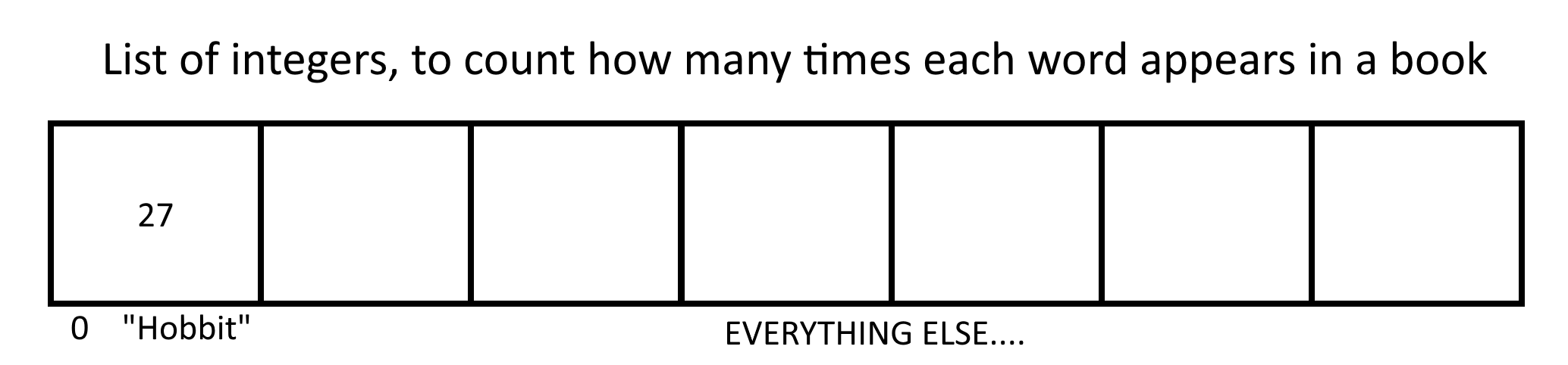
Suppose we wanted to look at our previous problem again, where we want to record unique words and how many times those words appear in “The Lord of the Rings”. What if we wanted to make this a bit easier on ourselves by saying “We’ll do the same thing as before, but the word ‘Hobbit’ will ALWAYS be in the first slot in our list”. Since we know that “Hobbit” ALWAYS exists at index 0, whenever we encounter the word “Hobbit” while reading the book text, we can just increment slot 0 of the list:
OK, but what about all the other words? What if we could extend this concept so that whenever we’re presented with a word, we know right where it is in this list-type-thing?
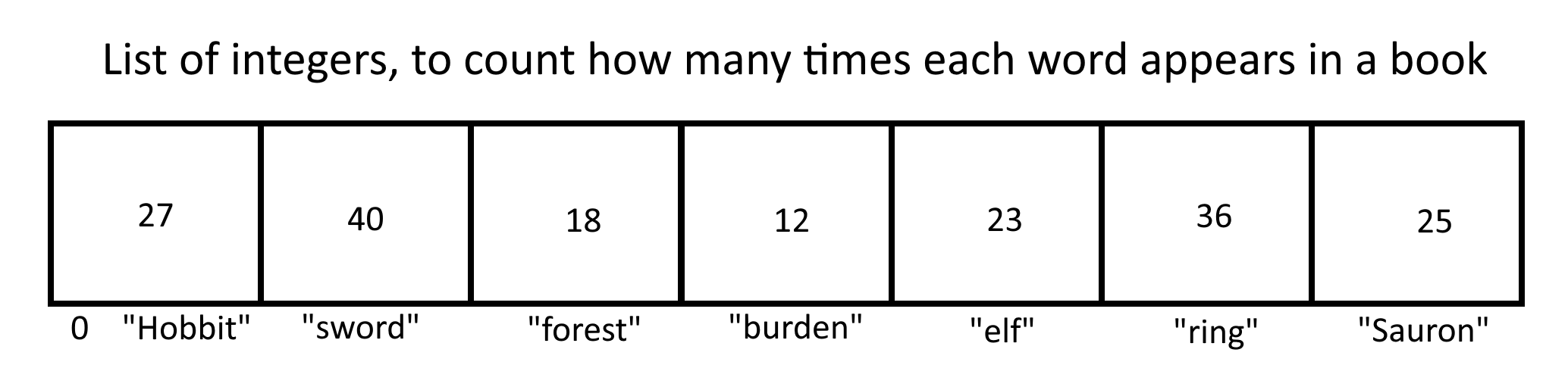
This is essentially what a Dictionary does: it allows us to associate a key with a value, meaning we could access our list-type-thing above (which is actually a dictionary) with the following syntax:
//Going off of the image above,
//the value of x would be 18

int x = myDictionary["forest"];
Reminder: a dictionary associates a key with a value. In the image above, the word/string is the key, and the count/int is the value!
Syntax
So in C#, the syntax for creating a dictionary is:
Dictionary<keyType, valueType> thing = new Dictionary<keyType, valueType>();Where keyType can be any type, and valueType can be any type. For example:
Dictionary<string, int>This would be a dictionary that uses strings as keys, and integers as values. OR:
Dictionary<int, Goblin>This would be a dictionary that uses integers as keys and Goblins as values!
Another way to think of a dictionary is: a dictionary is just a list of values (the value type), but we get to specify HOW we want to index those values. Instead of a list or array, which uses integers starting at 0 for the index, we can use whatever we want for the index (the key type)!
So how would we change our code above if we wanted to use a dictionary instead?
string bookText = File.ReadAllText("LOTR.txt");

//We'd need to split on more than just spaces,
//but that's not important right now

string[] bookWords = bookText.Split(' ');
Dictionary<string, int> wordCount = new Dictionary<string, int>();

for(int i = 0; i < bookWords.Length; ++i)
{
	string word = bookWords[i];
	if(! wordCount.ContainsKey(word))
	{
		wordCount.Add(word,0);
	}
	++wordCount[word];
}
We are iterating through all of the words in the book. We first check to see if the current word is in the dictionary already. If it isn’t, we add it to the dictionary, using it as a key, with a value of 0. We then increment the value in the dictionary associated with the current key, our word.
This way, we don’t need to make multiple lists, and we don’t need to traverse those lists to find the word we’re looking to increment; we just go straight to it and increment!
How does this magic work?
You might be asking, “why do we need to traverse a List, but we don’t need to traverse a Dictionary?” The answer lies in the name: dictionaries associate a key with a value, so we use the key to go straight to the correct spot in our data structure. With a LIST, we can go to the 176th element of the list using index 175. With a DICTIONARY, we can go to spot “Bob” by using index “Bob”.
OK ok… but HOW does that actually WORK, for REAL tho?
That’s beyond the scope of our class, but if you’re really curious about diving into the dark magic behind how a dictionary works, you should look up Hash Tables and Hash Functions. These are the concepts that form the core of a Dictionary.