Online resources that go with this: https://azrael.digipen.edu/~mmead/www/Courses/CS180/OSOverview.html
Previously we talked about the 3 big concepts that allow operating systems to effectively manage the resources of a PC… remember what they are?
The big 3 concepts in Operating Systems
Virtualization, Concurrency, and Persistence
We also talked a bit about some of the resources that the operating system manages. Chrome, Photoshop, an Unreal game, or even a console app… they can all ask for different PC resources to accomplish some task specified by the user of the program. What are some of the resources we talked about on Monday that the OS manages?
Resources managed by the OS... what are they?
- Memory (the initial stack memory of a process, or malloc/free)
- CPU time (executing instructions, aka RUNNING a program)
- Network (sending/receiving data, accessing network ports)
- Disk/storage (accessing long-term storage to read, write, create, or delete files)
- IO and Devices (mouse, keyboard, gamepad, printer, webcam, mic, speakers, screen)
Let’s go through some terms and definitions related to OS concepts. On Monday we talked about these concepts at a high level, for HOW the OS manages system resources. But we didn’t get into as much of the nitty gritty about WHAT an OS actually IS. So hearing some of this terminology will be especially important for those of you who haven’t been exposed to it before. You might have heard about some of it in CS100, 120, and 170, but a refresher never hurts.
What makes up an OS?
So… how would you define an operating system? What “makes up” an operating system?
Stuff in a typical OS #1
The Kernel This is the OS program that is started by the BIOS/bootloader on your machine The kernel is the actual manifestation of the operating system (similar to program/process) It represents the programmatic layer between user programs and the hardware of a PC
Stuff in a typical OS #2
Services There are many different services (running processes) that are NOT part of the kernel However, they’re still under the purview of the OS They run in the background and keep your PC running smoothly (or not!) Examples: Update Orchestrator Service, Windows License Manager Service You can actually create your own “services” https://learn.microsoft.com/en-us/dotnet/framework/windows-services/introduction-to-windows-service-applications
Stuff in a typical OS #3
Device drivers/Hardware drivers Software that facilitates communication between a device and the OS You’ve probably encountered “driver issues” before Common example: NVIDIA drivers! For artists: WACOM/tablet drivers! Note: you might have also heard the term Firmware when talking about devices Firmware is software running ON a device (how does a printer’s software WORK)
The Kernel
Wait so… we mentioned that the Kernel is the “manifestation of the OS”, the layer between user programs and our computer’s hardware. So does that mean the Kernel is a program just like any other?
Well, yes!… and no. Sorta.
In one sense, the Kernel is just like any other program; it has instructions that are executed by the CPU, it allocates memory and uses that memory for different purposes, etc. But then, how does it get to manage all the other running processes? How can a “normal” program have that much control over everyone else? It all boils down to access. The OS Kernel gets to execute processor instructions and access regions of memory that are off-limits to regular programs. In that way, it can set up systems to manage the other running processes and allocate/manage the resources those processes use.
How does the Kernel get these magical access privileges? Turns out, your CPU can operate in two different modes: user mode and kernel mode. We’ll chat about these modes a bit more later, but it’s important to know that your PC switches between these two modes frequently, and it’s this mechanism of processor modes that allows the Kernel to manage running processes and system resources.
Hardware
Remember when I mentioned the Gameboy and Super Nintendo, and the assumptions you can make when writing a program for those consoles? Not only do you not have to worry about other programs running at the same time, but you also are directly accessing the hardware. There is no layer between your code and the machine’s hardware.
But since a modern OS acts as an interface between user programs and hardware, we need to have an understanding of what modern computer hardware looks like. That will help facilitate our understanding of what the OS is doing when it decides to share CPU time, or move different programs in and out of RAM, or write files to disk.
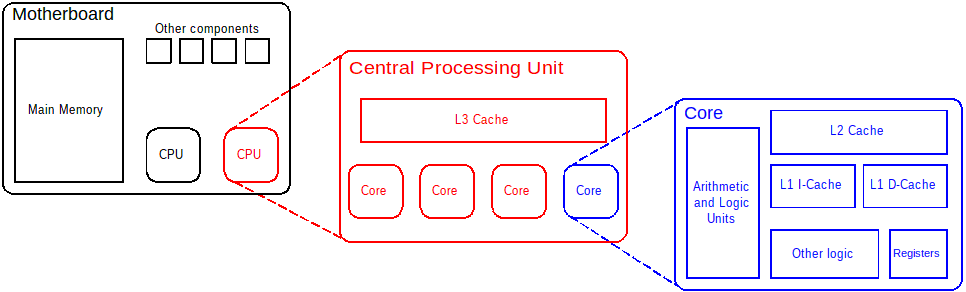
CPU
Usually has multiple CORES (a group of components that act as a single “processing unit”) In the past we had a single processor per machine, now we have a single processor with multiple cores (a misnomer) What is actually IN a core?
ALU (arithmetic logic unit)
Performs all the math and bitwise logic operations
MMU (memory management unit)
As its name suggests: helps manage memory of the CPU To this end, it contains a component called TLB: translation lookaside buffer The TLB translates logical (virtual) memory addresses into physical RAM addresses (we spoke about this on Monday… the TLB facilitates the virtualization of RAM memory!)
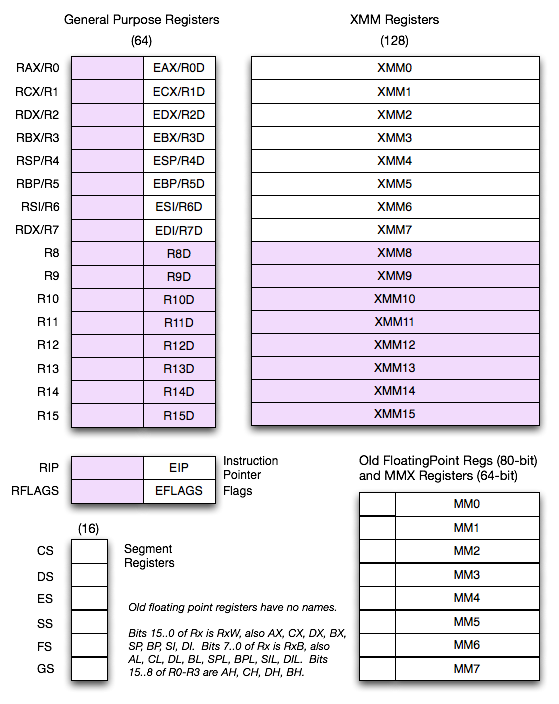
Registers
Small but blazingly fast computer memory, located in a CPU core
This where a CPU core fetches instructions and data to work on
When a core shoves something into its ALU, this is where the data comes from
But of course… how do data and instructions get into registers in the first place?
Cache
Also fast memory! Not as fast as registers though… There are different levels of cache: L1, L2, L3 L1 and L2 cache usually live on the CPU itself; L3 is separate
Buses
How memory is shuttled to/from the CPU Previous versions of this concept (northbridge/southbridge) are antiquated We still need to shuttle data around, but components that used to be separate are now incorporated directly into the CPU itself One of the common themes of the last 20 years of computing: put components closer to the CPU This is why things like the L1 and L2 cache exist ON THE CPU: the closer something is to the CPU, the faster it can be transported to registers to be WORKED ON