Online resources that go with this: https://pages.cs.wisc.edu/~remzi/OSTEP/intro.pdf https://azrael.digipen.edu/~mmead/www/Courses/CS180/Virtualization-1.html https://azrael.digipen.edu/~mmead/www/Courses/CS180/OSOverview.html
On many older computers, if you wanted to write a program for that computer, you would just… write a program for that computer. What do I mean by that?
Well take the Gameboy or Super Nintendo for example. If you wanted to write a piece of software for one of these systems, you would need to write it in assembly code. You’d be talking directly to the processor of these respective systems, so you’d need to know the corresponding assembly code for that processor.
| Gameboy | Super Nintendo | Gameboy Processor | SNES Processor |
|---|---|---|---|
 |  | 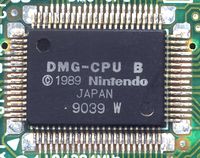 | 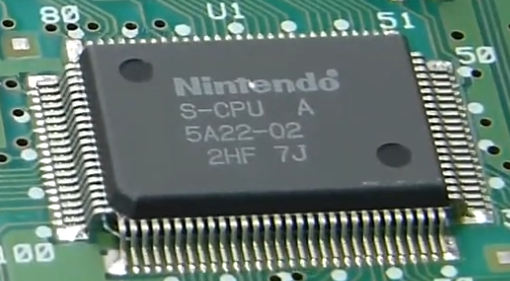 |
Not only that, but when you write a program or game for one of these systems, you can assume that there’s only ever ONE program running at a time. Your program has ALL of the system’s resources available to it at once! The CPU, the sound card, the graphics processor, the peripherals, all of these belong to YOUR PROGRAM, because it is the only thing that’s running.
But think about how modern computers work. You know that when you’re running Windows or Linux or even your phone, that you might have a number of different applications running at one time. You could be using a web browser, while you’re waiting in an online queue in a PC game, while you’re playing music from your hard drive, and you could also be making a backup of all the homework and school stuff you have stored on your desktop. And even if YOU aren’t running any programs, there’s still a desktop, and a bunch of other things running in the background that weren’t initiated by YOU.
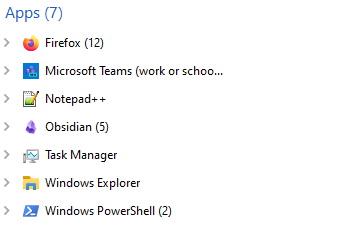
And yet, we don’t really write programs much differently NOW than we did for the systems I mentioned earlier. Sure, you’d be writing in C instead of assembly language, which is a big change… but when you write C code for a modern program, you’re not actually thinking about “What if the user is ALSO running Chrome!?! Or what if they’re backing up their hard drive!?! How do I make sure that MY program isn’t messing up OTHER programs that are running at the same time? And how DO programs all run at the same time on one machine, without constantly stepping on each other’s toes?”
This is one of the primary responsibilities of an operating system: to manage how running applications access system resources like memory and processing time. OK cool, you already heard about that in CS100 and CS120. The question is HOW does the OS actually DO that? How does it manage access to system resources?
There are 3 main concepts that an operating system employs to achieve this. And they’re the main concepts we’re gonna explore in this course (there’s actually a 4th concept, Security, but we’re not going to discuss that much in this class).
Virtualization
Virtualization is a way for the operating system to present one physical resource as if it is several virtual ones. For example, say we create a program that takes an input string from the user. Then, every second in a loop, it barfs that string back out. If we run that program, we’ll see the input string every second. But what if we run five instances of this program AT ONCE, with different strings? Well we’d see each program barfing out those strings seemingly at the same time, running at the same time. Except, we only have ONE PROCESSOR on our machine!
These programs aren’t actually running AT THE SAME TIME, because the operating system is virtualizing the CPU: each running application wants to feed instructions and data to the CPU, and the operating system makes it appear that each running program is the ONLY ONE that’s doing this.
Of course the OS also virtualizes memory!
Say we write a program that allocates memory at a particular address. If we then perform the same experiment we did before, where we run 5 versions of this program at the same time, we’ll see something odd: each program is allocating memory at the SAME ADDRESS! But that’s impossible, right? Are they really all writing to the same place?
No, they’re definitely not doing that. Even though each of these running applications is stored in a distinct section of your computer’s RAM, the memory addresses you’re altering (which you might see when you, say print out a pointer’s value) aren’t numbered based on where they are in RAM. There is a mapping between the “pretend” or virtual address space of these running programs, and your ACTUAL RAM. That’s why if you edit the value at address 5682 in program A, it won’t affect anything at address 5682 in program B.
And that’s the beautiful part! Program A doesn’t know ANYTHING about Program B. Each program appears to have its own little address space all to itself, when in reality these programs are all being held in different spots in the same physical RAM. The OS is responsible for mapping physical memory to the virtual address space of each program.
One thing that is NOT subject to this same kind of virtualization is the file system of your PC. That’s because when a running program wants to access files for reading and writing, it likely wants to access the SAME FILES as everyone else. For instance, maybe you’re making a game, and you want to change the color of the main character sprite. You can do that using something like Paint.NET, or Photoshop, WHILE the game is running, so you don’t need to close the game. You can see the change in real time because these two DIFFERENT processes are looking at the same files.
Concurrency
This is related to virtualization but is actually its own distinct problem. Virtualization deals with the illusion that each running program has access to its own pool of resources. But concurrency is the problem of: how does the operating system actually juggle ALL these different processes at once?
Say you’ve got 7 programs running on your PC. If the OS is virtualizing the CPU, that means the OS is making it APPEAR as if there are 7 processors, but in reality we only have one. So what’s actually happening? Under the hood, the operating system is deciding which programs to run at which time… it switches between them rapidly! Some instructions for one program go in, and are executed, then the OS says “OK, we’re executing instructions for THIS” program now, everyone out!” and a whole different set of instructions for a different program are swapped in to be executed. This swapping of data and instructions is happening fast enough that it is imperceptible to the user of the PC.
But that just raises more questions! How does the OS decide on which programs to execute, and when? Should the OS just give each app an equal itty bitty slice of CPU time? And then just schedule each app to run on the CPU in a nice orderly fashion? What if Minecraft NEEDS a lot of CPU time because you just spawned 100 TNT blocks, exploded them all at once, and now there are a gajillion gameplay and physics updates that need to happen because everything is blowing up?
This gets even more complex when we consider that I actually LIED to you earlier; your PC actually IS running multiple programs at the same time!
The language is gonna get a bit dicey here, so stay with me: Your computer’s CPU is its Central Processing Unit. This includes an ALU, an FPU, registers, some cache, and other mechanisms so the CPU can PROCESS instructions.
However, modern CPUs have what are called CORES. Basically your CPU isn’t just one physical processor. It’s a bit of a misnomer, because what we call a CORE is actually just a processor itself. Up to now, we’ve simplified things by saying “Oh your CPU is the one central processing unit on your computer!” When really, each CORE of your CPU can run independently. Check how many cores you have on YOUR processor!
So the operating system can shove one running process into one core, and another running process into another core! Multiple processes can run concurrently, which helps the OS maintain the illusion of everything running all at one time.
The interesting thing is, you as a programmer don’t really get to specify how the OS swaps these processes around in your CPU’s cores. However, you can still leverage all the cores of your machine by adding something called THREADS to your program! I’m gonna guess it isn’t TOO many of you, but I’m curious: How many of you have written a multi-threaded program before? Some of you might not be fully aware of what threads actually ARE, or what it means for a program to be multithreaded.
The way this works, for those of you that aren’t aware: you can ask the operating system to create a thread for your running program. This new thread is separate from the main thread of your program, like splitting off a little worker that can do something else! There are ways to specify WHAT that thread will do in your program. So now, your program actually has two different code paths that are running at the same time! Certain kinds of operations really lend themselves to splitting the execution of your program across these cores, and could result in a speedup to your program’s running time.
 |  |  |  |  |
There are a number of different issues that can crop up with this (for example: what happens if two different threads of your program want to modify the value of one variable in memory?). But we’ll get to those issues once we learn about threads for real.
The operating system is doing this in a different way: if you’ve got 7 processes running at once, the instructions for one program might be handled by one core, at the same time the instructions for another program might be handled by a DIFFERENT core. The OS is responsible for handling this concurrency.
So we’ll talk a bit about both in this class, and you’ll even write at least one multi-threaded program. Even though multithreading in a C program isn’t quite the same as the OS scheduling different processes concurrently, there’s still a decent amount of communication that a process must do with the OS to make this work, and it’s worth exploring.
Persistence
Recall that there are, broadly speaking, two main types of memory when talking about computers: persistent storage, like a hard drive (SSD, NVME, USB drive, platter drive) and volatile storage, like RAM and the cache of your CPU. When you turn your PC off, any data stored in the volatile memory of your computer is lost. But persistent storage is unaffected.
This is one of the more intuitive parts of using modern computers; whenever you save a text document, or load a Minecraft world, or create an executable from compiled code, you’re interacting with persistent storage. You’re reading, writing, creating, and deleting files. But as I listed above, there are all kinds of different storage mechanisms for persistent storage. How does the OS manage this?
One of the operating system’s most important jobs is facilitating persistent storage via a File System. The OS is able to present the user with a way to manage files and directories, and under the hood it needs to be able to save data and keep it… well, persisting! And the OS should be able to do this regardless of what kind of storage is actually being used at the hardware level (SSD, USB flash drive, etc).
You’ve all done this, on some level. You’ve written programs that make calls to ‘open()’, ‘read()’, ‘write()’, and ‘close()’, or some equivalent of these. These are actually system calls; they’re routed to some native implementation that directly calls the operating system. And there’s a ton of stuff happening under the hood! When something is saved to disk, WHERE is it saved? How does the OS keep track of it once it is saved there?
We’ll talk about this during at least two different weeks, covering File Systems one week, and Disk Structure the next.
Abstractions
That’s… kinda what we’ve been talking about this whole time!
Programming all the way up/down is abstractions! And operating systems are no different!
Programming C → Assembly → Processor-specific instructions → Logic gates → transistors
Operating Systems File system → underlying file storage devices (USB, disk) Memory → RAM and cache I/O devices → mouse, keyboard, headphones, speakers, controllers