We’ve gone over what processes are, the different states they can take, and how the operating system keeps track of them. Great!… so now how do we work with processes from the programming side? The easiest way, of course, is to write a program and execute it!
We know that when you start an .EXE, the program’s contents are copied from disk into RAM, and its state is being managed by the OS. But what does that look like in practice? There is an API, provided by the OS, to accomplish this task as well as other common process-control tasks. This process API is incredibly powerful; we can use it from within our programs to spawn our own processes dynamically, at run-time! Every operating system has their own API for spawning and controlling processes, but we’ll be focusing on the Linux process API in this class.
So, what would the common functions of a process API look like?
- Create - Goes without saying, you need a way to create a process. This function is being called whenever you double click an .EXE file.
- Destroy - Ever needed to kill a process via Windows Task Manager? Yeah, it’s this function.
- Wait - Wait for a process to stop running (maybe your process depends on another one finishing?).
- Misc - This may include operations like suspend, etc.
- Status - Get info about a process, like its PID, current state, how long it has run, etc (think of Windows Task Manager).
OK, that all makes sense… what about more specifics?
We’re going to discuss the Fork, Wait, and Exec family of function calls, which are Linux’s version of a process API (there are other functions too, but these are the ones we care most about). Some common questions about these calls, after seeing what they do, are why is this API set up this way, why would I want to Fork, then Exec? We’ll talk more about why this API is the way it is after we’ve gone over how it works.
Fork
Linux provides us with a system API call known as fork. This function can be used by a running process to spawn what is known as a child process (basically, just another process). But this function probably doesn’t work how you’d think… let’s walk through it! This example also exists in the OSTEP book, so feel free to follow along there if you’d like.
1 #include <stdio.h>
2 #include <stdlib.h>
3 #include <unistd.h>
4
5 int main(int argc, char *argv[]) {
6 		printf("hello (pid:%d)\n", (int) getpid());
7 		int rc = fork();
8 		if (rc < 0) {
9 			// fork failed
10	 		fprintf(stderr, "fork failed\n");
11	 		exit(1);
12	 	} else if (rc == 0) {
13	 		// child (new process)
14	 		printf("child (pid:%d)\n", (int) getpid());
15	 	} else {
16	 		// parent goes down this path (main)
17	 		printf("parent of %d (pid:%d)\n",
18	 		rc, (int) getpid());
19	 	}
20	 	return 0;
21 }
Let’s break this program down into sections:
We’re just printing the PID of the process here with the getpid call. Neat!
6 printf("hello (pid:%d)\n", (int) getpid());Now we’re calling fork, and it returns an integer. rc just stands for “return code”, so we know if our fork call succeeded.
7 int rc = fork();After this call succeeds, if we were to look at the processes running on our Linux OS, we’d see something VERY interesting: we should now have TWO processes running on our machine that look almost identical! One process is the one where we just called fork. The other is a COPY of that process, which STARTS its execution from the place where fork was called! Which means BOTH processes should now be right here:
8 		if (rc < 0) {
9 			// fork failed
10	 		fprintf(stderr, "fork failed\n");
11	 		exit(1);
12	 	}
Both processes should now be checking if fork failed (which, if we have two processes, it shouldn’t have!). If it HAD failed we’d be printing out an error message and exiting the process.
This is crazy! We have a way to copy our running process and make a new one, on the fly! How awesome is that! OK, cool… so what now? We have two programs… that are identical? How does that help us? The nice thing is that they’re only MOSTLY identical!
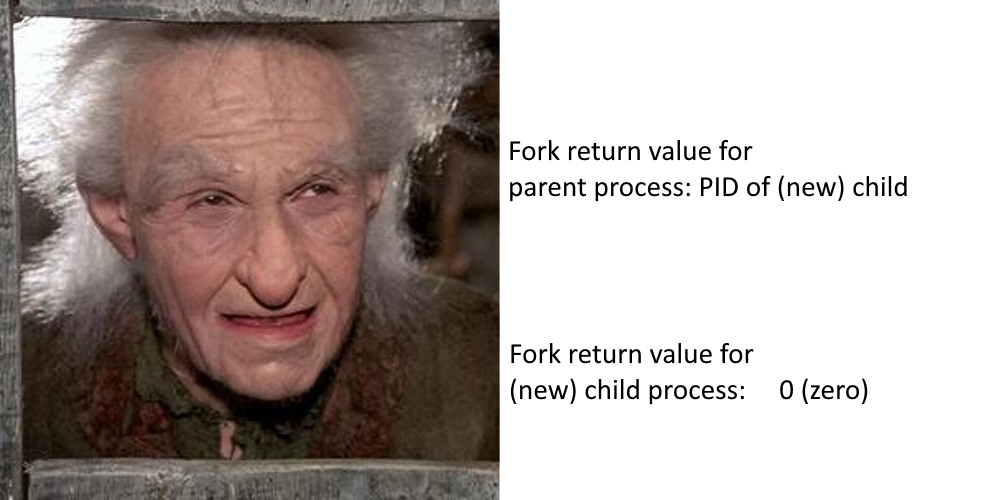
So fork returns something different for the new child process we’ve created! Which means, this code will now make a bit more sense:
12	 	else if (rc == 0) {
13	 		// child (new process)
14	 		printf("child (pid:%d)\n", (int) getpid());
15	 	} else {
16	 		// parent goes down this path (main)
17	 		printf("parent of %d (pid:%d)\n",
18	 		rc, (int) getpid());
19	 	}
We can branch our program to do something different based on whether it is the parent process or a child process! Pretty nifty, eh?
In addition to having a different return value from fork, each process should have its own PID, its own address space, its own copy of each variable, etc. This new child process is a COPY. None of the variables or state are shared between these processes, because they are completely separate/different processes now.
Another interesting thing to note about our new situation is that the output of our programs running together is no longer deterministic. That’s because these are two separate processes that can be scheduled in a dark-magic arbitrary way by the OS scheduler, meaning either the child or parent could print first. Either of the two examples below are possible:
This could happen:
hello (pid:29146)
child (pid:29147)
parent of 29147 (pid:29146)
Or this!
hello (pid:29146)
parent of 29147 (pid:29146)
child (pid:29147)
We don’t need to worry about this too much at the moment, but it’s important to note that it happens.
Wait
Another system call we can use is called Wait. This allows us to… wait… on a process to complete before the current process keeps going:
1 #include <stdio.h>
2 #include <stdlib.h>
3 #include <unistd.h>
4 #include <sys/wait.h>
5
6 int main(int argc, char *argv[]) {
7 	printf("hello (pid:%d)\n", (int) getpid());
8 	int rc = fork();
9 	if (rc < 0) { // fork failed; exit
10 		fprintf(stderr, "fork failed\n");
11 		exit(1);
12 	} else if (rc == 0) { // child (new process)
13 		printf("child (pid:%d)\n", (int) getpid());
14 	} else { // parent goes down this path
15 		int rc_wait = wait(NULL);
16 		printf("parent of %d (rc_wait:%d) (pid:%d)\n",rc, rc_wait, (int) getpid());
17
18 	}
19 	return 0;
20 }
This program is similar to the one we saw above, but with one tiny change:
14 	// parent goes down this path
15 		int rc_wait = wait(NULL);
The parent process is now waiting for the child process to complete. This would put the parent process into something like a blocking state, as it waits for the OS to signal that the child process has finished executing.
There is another version of this function called waitpid, which waits on a specific child; we didn’t walk through an example with multiple child processes, but we can technically call fork a bunch of times, spawning a number of children! Looking at the man pages for wait/waitpid:
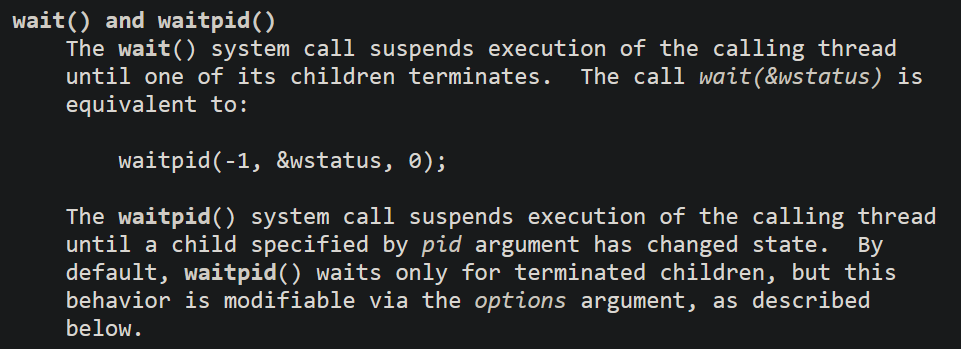
Wait will wait on a single child, which could be any previously Forked child. WaitPID will wait on a specific child, with a matching PID.
Exec
Whenever we fork a process, it is almost identical to the parent process it was forked from. This is all well and good if both the parent and child are going to do similar things. But it does make the code a bit messier, doesn’t it? The more disparate the instructions are for each process, the more it looks like you’re making two different programs with one set of code. There would be one conditional that splits the instructions after the fork, and the the child/parent would be doing completely different things… not a very sensible way to write code!
Instead, we can use the exec family of functions just after the call to fork, so that the child can become its own unique process. There are a number of different calls in the exec family that you can look up at your leisure, and they’re all used in slightly different ways (to facilitate a flexible process API). You can use whichever you like, though I’ll be showing you the execv function.
int execv(const char *path, char *const argv[]);I’ll try to let the man pages speak for themselves here:
	FIRST ARGUMENT
	const char *path

		The first argument, by convention, should point
		to the filename associated with the file being executed.
Seems pretty straightforward: the first argument is just the binary (you’d call this an .EXE on Windows) that you want to change this process into. You either need the full path, or something relative to where your current process is running.
	SECOND ARGUMENT
	char *const argv[]

       The char *const argv[] argument is an array of pointers to null-
       terminated strings that represent the argument list available to
       the new program.The array of pointers must be terminated by a null pointer.
These are the command line arguments you’ll be giving to this new process. It’s essentially info from “the outside world” (meaning whoever started the process) so that the new process has some context for how to perform its instructions. Recall that setting up the command line arguments is something that the OS takes care of when it is creating a new process.
	RETURN VALUE

       The exec() functions return only if an error has occurred.
       The return value is -1, and errno is set to indicate the error.
What’s interesting about that text above? It says the exec functions “return only if an error has occurred”… meaning that if the exec was successful, they DON’T return! The new process will have started, and the variables, the stack, etc that are associated with the old process are destroyed! Basically, if you get a return value from exec, it definitely failed, and you should look at errno (similar to the other two calls above) to figure out why.
Why is the API structured this way?
I’ll leave it to the textbook (page 6) to explain the quirky setup of the Linux process API: https://pages.cs.wisc.edu/~remzi/OSTEP/cpu-api.pdf
Long story short: these calls are rooted in how a Unix shell actually works. A Unix shell allows the user to type in a command, which will then be run by the shell. OK… what does that have to do with Fork/Exec?
Well since a Unix shell is just a program, the way it starts another program is… by calling Fork/Exec! The command entered by the user is really just the name of a program binary that exists somewhere on disk. The shell will Fork, then use Exec to paste over the new process with the one specified by the user’s command.
Additionally, common uses of the Unix shell necessitate that Fork/Exec are separated, so new child process can do some additional setup before calling exec. The textbook has a good example of why:
OSTEP, Chapter 5, Page 6
“The separation of fork() and exec() allows the shell to do a whole bunch of useful things rather easily. For example:
prompt> wc p3.c > newfile.txtIn the example above, the output of the program wc is redirected into the output file newfile.txt (the greater-than sign is how said redirection is indicated). The way the shell accomplishes this task is quite simple: when the child is created, before calling exec(), the shell (specifically, the code executed in the child process) closes standard output and opens the file newfile.txt. By doing so, any output from the soon-to-be-running program wc is sent to the file instead of the screen (open file descriptors are kept open across the exec() call, thus enabling this behavior…The reason this redirection works is due to an assumption about how the operating system manages file descriptors. Specifically, UNIX systems start looking for free file descriptors at zero. In this case, STDOUT FILENO will be the first available one and thus get assigned when open() is called. Subsequent writes by the child process to the standard output file descriptor, for example by routines such as printf(), will then be routed transparently to the newly-opened file instead of the screen.”